Logiciel de sauvegarde Thunderbird
La sauvegarde de Thunderbird avec Handy Backup permet de conserver les dossiers de messagerie locaux ainsi que les paramètres du programme stockés sur votre PC. Vous pouvez ainsi restaurer plus facilement votre environnement de messagerie après une perte de données, une migration système ou une réinstallation du client mail. Essayez la version gratuite de 30 jours pour tester concrètement cet outil de sauvegarde Thunderbird.
 Télécharger gratuit
Version 8.7.3, compilée le 11 août 2026. 152 Mo
Période d’essai complète de 30 jours





Quand utiliser un logiciel de sauvegarde Thunderbird


Prévention de la perte de données
Assurez la protection de vos e-mails importants contre toute suppression accidentelle ou défaillance matérielle. Handy Backup crée automatiquement des copies de vos messages Thunderbird, vous permettant de restaurer facilement les données perdues.
Accès hors ligne
Lorsque vous avez besoin d’accéder à vos e-mails sans connexion Internet, Handy Backup vous permet d’enregistrer vos messages Thunderbird dans un format portable. Vous pouvez ainsi consulter et gérer vos e-mails même hors ligne.
Conformité et archivage
Conservez l’historique de vos correspondances électroniques pour des raisons légales ou de conformité. Handy Backup archive vos e-mails Thunderbird dans un format sécurisé, facilitant l’accès et la récupération des informations importantes lorsque nécessaire.
Avantages du programme de sauvegarde Thunderbird
Automatisation
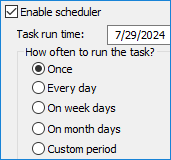
Grâce aux tâches planifiées pour les sauvegardes des e-mails Thunderbird, vous ne manquerez aucune exécution. Vous pouvez également activer l’option permettant d’exécuter les tâches manquées, par exemple si l’ordinateur était éteint au moment prévu.
Sécurité
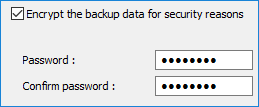
Vous pouvez utiliser des outils de sécurité intégrés, tels que le chiffrement, pour protéger vos sauvegardes de messagerie Thunderbird avec Handy Backup. De plus, Handy Backup prend en charge de nombreux espaces de stockage sécurisés, notamment la sauvegarde automatique vers Dropbox (ou d’autres services cloud populaires), ainsi que des stockages SFTP/FTPS, etc.
Contrôle
Handy Backup propose de nombreuses options de gestion des tâches en plus de la planification. Le programme peut exécuter les tâches en mode silencieux en tant que service Windows, lancer d’autres applications avant et après une tâche de sauvegarde Thunderbird, envoyer des notifications par e-mail sur les résultats, et bien plus encore.
Options de stockage pour la sauvegarde et la restauration Thunderbird
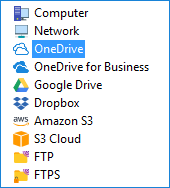
Handy Backup prend en charge de nombreuses solutions de stockage pour enregistrer vos sauvegardes Thunderbird, notamment :
- Services cloud populaires tels que Amazon S3, OneDrive, Box, Dropbox et Google Drive ;
- Tout service cloud compatible S3 ou WebDAV pour les sauvegardes Thunderbird en ligne ;
- Serveurs FTP et NAS pour la sauvegarde et la restauration au sein de réseaux locaux ;
- Stockages locaux, comme les disques durs internes ou les dispositifs DAS (clé USB, disque externe, etc.).
Comment sauvegarder automatiquement les e-mails Thunderbird
Pour sauvegarder les e-mails Thunderbird, utilisez le plug-in Computer, qui permet d’accéder à n’importe quel dossier local. Ce plug-in prend en charge les sauvegardes à chaud, ce qui signifie que le client reste actif pendant l’enregistrement des données.
Comment Handy Backup enregistre les e-mails Thunderbird depuis les dossiers locaux
Suivez les étapes ci-dessous pour créer une tâche de sauvegarde. Pour plus de détails, consultez le manuel utilisateur.
- Lancez Handy Backup et ouvrez l’assistant de nouvelle tâche (Ctrl+N ou bouton Create).
- À l’étape 1, sélectionnez le type de tâche, puis passez à l’étape 2.
- Dans le panneau de gauche, ouvrez la section Local or network drive et sélectionnez le plug-in Computer.
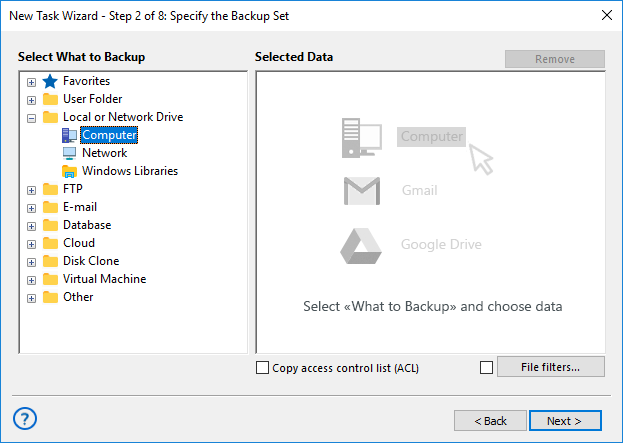
- Parcourez la liste des dossiers pour trouver votre profil Thunderbird.
- Sélectionnez le dossier de sauvegarde en cochant la case correspondante.
- Répétez l’opération pour tous les comptes nécessaires.
- Ajoutez également les dossiers contenant contacts, carnet d’adresses et paramètres si besoin.
Remarque : Le même plug-in peut être utilisé pour sauvegarder l’ensemble du profil Thunderbird.
- Sélectionnez tous les fichiers requis puis cliquez sur OK.
- Terminez la configuration de la tâche.
Restauration des données Thunderbird
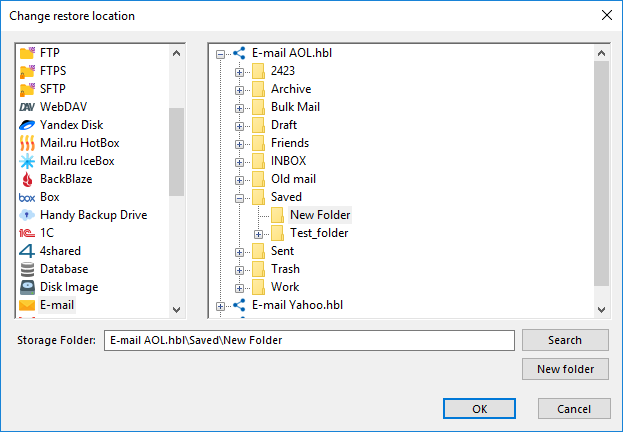
Vous pouvez restaurer les données soit à leur emplacement d’origine, soit vers un nouveau dossier, ou encore vers un service de messagerie Web via le plug-in « E-mail ». Utilisez l’outil de migration IMAP pour exporter les messages.
- Créez une tâche de restauration.
- À l’étape 2, sélectionnez le fichier backup.hbi.
- En mode avancé, modifiez l’emplacement si nécessaire.
- Poursuivez la création de la tâche de récupération.
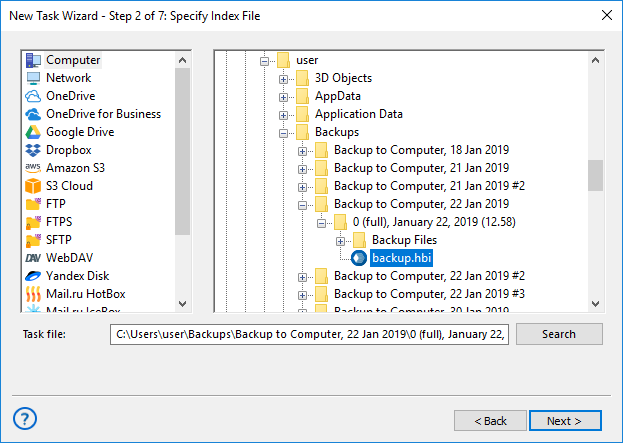
Remarque : Handy Backup utilise le format EML natif pour chaque e-mail, ce qui permet une restauration sélective ou un traitement manuel fichier par fichier.
Solución recomendada
Licencia de por vida

Software de copia de seguridad para el hogar
L’édition Standard inclut les plug-ins « Computer » et « E-mail » pour la sauvegarde Thunderbird, ainsi qu’un large choix de plug-ins de stockage courants. Essayez notre puissant outil de sauvegarde Thunderbird avec une version d’essai gratuite de 30 jours !
Additional Benefits of Handy Backup for Thunderbird Backup

Reports
Receive detailed backup reports and logs directly to your email. This feature helps you stay informed about the status of your backups and quickly identify any issues that may arise.

Lifetime License
Benefit from a cost-effective lifetime license option. This means you make a one-time purchase and receive updates and support for the lifetime of the software, without any additional costs.

Interface
Enjoy a highly intuitive and user-friendly interface that simplifies the backup process. The clean and organized layout ensures that both beginners and experienced users can easily navigate and utilize all features of the software.

Archiving
Effortlessly archive your backups into ZIP files if desired. This feature allows you to compress and store your Thunderbird mail backup data efficiently, saving storage space and making it easier to manage and transfer files.

Attachments
Save emails with all their attachments intact using a Thunderbird backup tool. This ensures that all files, images, and documents included in your emails are preserved, allowing for complete and accurate backups.

Convenient Native Format
Save your emails in the EML format, which allows for easy restoration of individual emails without the need for a full recovery. This format makes managing Thunderbird automatic backup straightforward and efficient.
Customer Reviews of Handy Backup's Thunderbird Backup Tool
Accessing Thunderbird Content via the E-Mail Plug-in: An Alternative Backup Technique
A key feature of Handy Backup for Thunderbird backup operations is the ability to directly access Thunderbird IMAP backups on the mail server, eliminating the need for local operations. For direct webmail backups, Handy Backup utilizes the "E-mail" plug-in from the "E-mail" group.
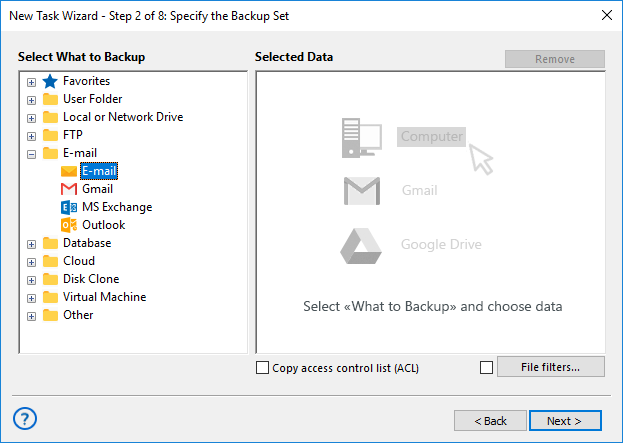
Caveat: For utilizing direct Web mail connection instead of Mozilla backup, check all server connection data (e.g. an address of a server, a port etc.) can be a necessary part of effective task building. Please read carefully all the documentation about a particular mail server to tune up a backup task quickly!
Using Thunderbird IMAP Backup with Advanced Settings for Mail Migration
With the "E-mail" plug-in, you can use Handy Backup as email migration software to not only save Thunderbird emails to a different location but also restore them directly to a server or move them to another email service. Handy Backup provides a seamless solution for these tasks.
Handy Backup can serve as both very effective Thunderbird backup software and a utility to make Thunderbird backup emails directly from a server. Experience yourself with its capabilities by downloading and installing a 30-day free trial version with all functions and plug-ins available!
Évaluation sur Capterra :

"Excellent produit, programme de sauvegarde très simple et efficace"
"From time to time, I backup my Thunderbird email content with a Handy Backup Standard, and I feel this as much more comfortable than just leaving my messages on a server. I can always make a local search through received mails, to get any information I need without recovery, as Handy Backup preserves native formats for all backup content!"
Justin Eagles, a Handy Backup customer
"I use Handy Backup for saving all my PC data, including Mozilla Firefox settings and Thunderbird backup. It helps me feeling comfortable, as I always know that I can restore my emails at any time."
Miranda G., a sales manager